TL;DR
-
MDM lets IT manage and secure phones, tablets, and laptops from one central console, enforcing encryption, passcodes, and access rules while enabling remote lock or wipe of lost devices.
-
Remote work and BYOD put company data on personal devices, so MDM separates work data from personal content, letting IT protect the business side without touching personal photos or messages.
-
Choosing a platform starts with your ownership model and device mix, then matching features like conditional access, DLP, and per-app VPN, and piloting before you commit.
-
The right tier depends on scope: devices only (MDM), apps and content too (EMM), or every endpoint including IoT (UEM).
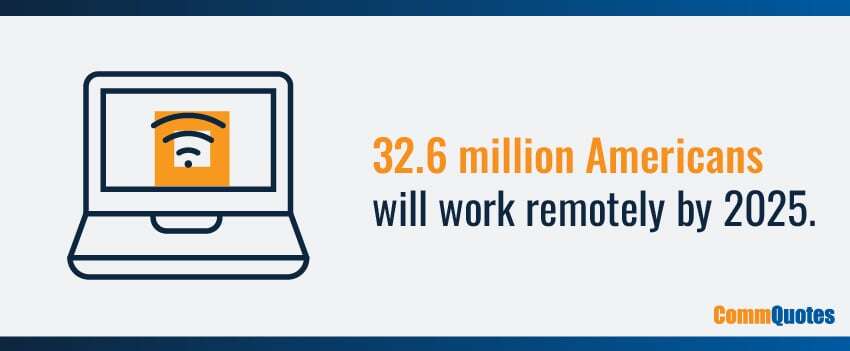
An estimated 32.6 million Americans will work remotely by 2025,1 making mobile devices vital to businesses of all sizes. Mobile devices have not only revolutionized the way we work by enabling flexible work-from-anywhere environments, but they also improve productivity, employee satisfaction, cost savings, and more.
Unfortunately, increasing mobile device usage comes with the challenge of maintenance. Employees use an average of 2.5 devices for work,2 including computers, mobile phones, laptops, and other personal devices. Managing and securing dozens or potentially thousands of devices often takes too much time and effort for IT teams – especially if they’re already overworked and understaffed.
That’s where mobile device management (MDM) comes in. In this blog, we’ll explore why more business leaders are turning to MDM solutions to simplify device management – and how you can find the right MDM platform to support your workforce.
What Is MDM: MDM Meaning & Core Concepts
MDM solutions help businesses secure, monitor, and manage mobile devices across the organization. Whether your workforce uses personal devices or mobile phones, tablets, and laptops owned by the company, MDM software provides a centralized platform for your IT team to manage them and secure corporate data.
5 Key Benefits Of Mobile Device Management
MDM software can deliver several benefits for businesses, especially those with a remote or hybrid work environment. Here are some ways MDM solutions help businesses simplify workforce management:
Enhanced Security
MDM solutions can enforce security protocols on all devices connected to the corporate network. This includes password protection, data encryption, and remote wiping capabilities for lost or stolen devices, significantly reducing the risk of data breaches.
Improved Compliance
Mobile device management software can help ensure all mobile devices connected to your network comply with industry regulations and standards, which is crucial if your business is in a sector like healthcare, finance, and government.
Streamlined Operations
MDM software allows for the efficient configuration and deployment of applications and updates across all managed devices, saving your IT team valuable time and resources.
Increased Productivity
The remote troubleshooting and support features offered by many MDM solutions can help your IT team minimize downtime, optimize operational efficiency, and improve user productivity.
BYOD Support
MDM tools make it easier to implement a bring your own device (BYOD) strategy, giving your workforce the freedom to use their own devices while maintaining control over corporate data.
6 Signs Your Business Needs Mobile Device Management
Not every business needs mobile device management on day one, but a few clear signals mean it's time to put controls in place. If several of the following describe your operation, MDM has likely moved from optional to necessary.
-
Remote and hybrid work: Your team connects to company email, files, and apps from home Wi-Fi, airports, and other networks IT doesn't control.
-
BYOD with no boundaries: Employees already use personal phones and tablets for work, but nothing separates corporate data from their personal apps and accounts.
-
More devices than IT can track: Your staff manages a device count that's outgrown spreadsheets and manual updates, and things are starting to slip.
-
Compliance obligations: You operate in a regulated field like healthcare or finance and need enforceable controls, plus an audit trail to prove them.
-
Sensitive data on mobile: Customer records, contracts, or internal systems are reachable from phones that could be lost, stolen, or shared.
-
Onboarding and offboarding friction: Setting up a new hire's device is a manual chore, and there's no clean way to revoke company access when someone leaves.
One sign might be manageable with your current tools. Several together usually mean the manual approach has run its course, and a right-fit MDM platform will save more time and risk than it costs.
Mobile Device Management Examples
- Auto-push managed email, VPN, and Wi-Fi to new hires.
- Block unmanaged cloud drives from opening corporate files.
- Require encryption and MFA before SharePoint access.
- Remote-wipe a lost phone while preserving personal photos (BYOD).
How Does Mobile Device Management Work?
MDM solutions work through a combination of client software (also known as an MDM agent) and a central console. After installing an MDM agent on end-user devices, data from each device is sent to the MDM server, which administers commands based on predefined policies in the central console.
Once a device is enrolled, your IT team can manage, monitor, and secure it remotely. For example, administrators can distribute new software, push updates, and enforce security measures across all devices at once. If an employee’s device is lost or stolen, you can remotely lock it or wipe sensitive data to prevent unauthorized access to your network.
Zero-Touch Enrollment
Apple Automated Device Enrollment and Android Zero-touch let IT preconfigure devices so they auto-enroll on first boot. Users sign in; policies, apps, Wi-Fi, VPN, and email profiles land instantly, no desk visit.
Ownership Models
- BYOD: Personal device, work container.
- COPE: Company-Owned, Personally Enabled, two spaces, work + personal.
- COBO: Company-Owned, Business-Only, kiosk/rugged/single-use.
Pick the model first; your policy and controls follow.
MDM Features That Fully Support Your IT Team
MDM solutions enable IT teams to centrally manage mobile devices while respecting user privacy and maintaining enterprise security. Key mobile device management features include:
Mobile Device Enrollment
MDM software allows organizations to bulk enroll BYOD devices, making it easy to onboard new devices simultaneously or migrate existing devices to a new mobile management system.
Device Inventory & Tracking
MDM platforms provide a comprehensive overview of all employee and corporate-owned devices to help your IT teams maintain an up-to-date inventory and track the location of each asset.
Application Management
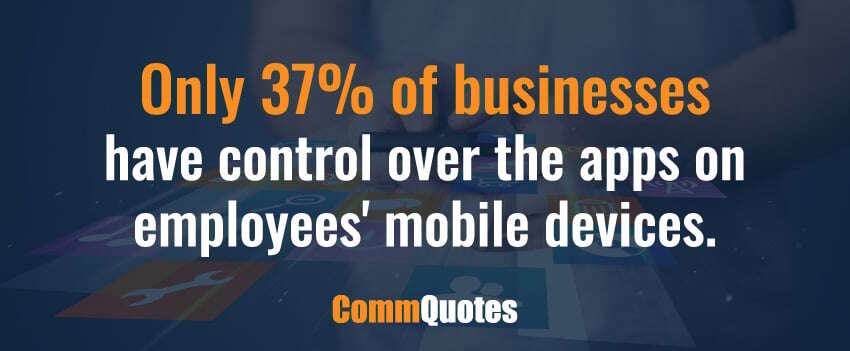
Only 37% of companies report having full control over cloud-connected applications on employees’ devices.3 The right MDM solution ensures seamless app distribution and automatic updating across all enrolled devices, ensuring everyone in your workforce can access the latest version of required business applications.
Compliance & Conditional Access
Connect sign-in to device health. If a phone lacks encryption, runs an old OS, or has no screen lock, access is blocked or quarantined until it’s fixed.
MDM Security
MDM solutions enable IT teams to consistently enforce security settings across your organization’s devices, like password enforcement and data encryption. They can also improve mobile threat defense by remotely locking or wiping stolen or lost devices to protect sensitive company data.
Data Loss Prevention (DLP) Controls
Keep company data in managed spaces. Control copy/paste, open-in, screenshots, local backups, and sharing to unmanaged apps.
Web & Content Filtering
Block risky or non-compliant sites on managed devices. Set allowlists and blocklists, filter by category, and stop unsafe downloads before they reach the device. On BYOD, scope filtering to the work profile or managed browser so personal browsing stays private.
Access Management
Secure mobile device management requires strong identity and access management tools. MDM helps IT teams manage the users associated with a device with such features as multi-factor authentication, single sign-on, and role-based access controls.
Certificate & Wi-Fi Profile Management (SCEP/PKI)
Issue and rotate certificates automatically. Push trusted Wi-Fi, email, and VPN profiles so users connect without passwords.
Per-App VPN & Split Tunneling
Send only approved app traffic through the corporate VPN. Personal traffic stays private and off your network. Lower latency and data costs.
Remote Troubleshooting
With MDM software, your IT staff can troubleshoot and offer device support remotely, minimizing unplanned downtime and enhancing employee productivity regardless of where your workers are located.
Reporting & Analytics
MDM platforms can provide detailed insights into device utilization, app performance, and security incidents, supporting informed decision-making and proactive management.
Jailbreak/Root Detection
Spot compromised devices quickly. Limit access or trigger a selective/full wipe based on policy.
Geofencing & Kiosk Mode
Apply rules by place or time. Lock devices to one app or a small set for frontline, retail, or rugged use.
Patching & OS Update Rings
Roll out updates in waves. Fast-track security fixes, defer risky builds, and track compliance.
eSIM & Roaming Controls
Provision cellular plans remotely. Set roaming and data caps to avoid bill shock.
Mobile Threat Defense (MTD) Integration
Add phishing, malware, and network risk signals from an MTD tool. Feed alerts back to MDM for automatic remediation.
Why Is Mobile Device Management Important For BYOD?
BYOD policies are becoming increasingly popular thanks to their ability to reduce costs, increase productivity, and improve employee satisfaction. However, the flexibility of BYOD comes with its own challenges – particularly concerning security and data management.
MDM addresses the risks associated with BYOD by establishing clear guidelines and controls over devices used for business purposes. Some MDM platforms also offer app wrapping, which provides a secure wrapper on mobile applications that enables IT departments to enforce security controls.
BYOD Advantages & Trade-Offs
BYOD cuts hardware spend and office overhead. Users work on devices they already know. It can also reduce tickets when self-service enrollment and policy updates handle routine tasks. The trade-off is risk: personal phones and tablets often ship without enterprise-grade protection, so clear policy and MDM controls are essential.
Privacy: What IT Can & Can’t See
IT manages the work profile, policies, and device posture. IT does not see personal photos, messages, or personal app content. Publish a short privacy note to build trust.
Common Mobile Device Management Best Practices
Adopting mobile device management software requires a strategic approach to ensure you receive maximum mobile security and effectiveness. Below are some MDM best practices to consider:
Clearly Define MDM Policies
Before implementing MDM, your business needs to have well-defined policies in place. These should outline the acceptable use of mobile devices, data handling practices, and consequences of non-compliance.
Regularly Update MDM Software
As with any software, mobile device management solutions need to be updated regularly to stay effective. This will ensure your system can address the latest security threats and leverage new device management features.
Enforce Strong Authentication
Improve device security and minimize the risk of malicious parties accessing your critical corporate resources and data by implementing stronger authentication and access controls on all mobile devices.
Train Employees
Employees play a crucial role in maintaining device security. Regular security awareness training can help them understand the importance of following data security standards and best practices for keeping their mobile devices secure.
Plan For Lost Or Stolen Devices
Have a contingency plan in place for lost or stolen devices that includes the ability to remotely wipe corporate data and prevent unauthorized access to the device.
Monitor & Review
Continuously monitoring and reviewing device usage and security incidents can provide insights to help refine your MDM strategy and address any potential vulnerabilities promptly.
Policy Starter Pack
Screen lock, encryption, minimum OS versions, approved app list, per-app VPN, data-sharing rules, jailbreak/root block, and a lost/stolen response.
Rollout Plan
Pilot with 10–20 users. Refine policies. Enroll by team in phases. Turn on conditional access when compliance is steady.
User Experience
Offer a self-service enrollment portal, a short privacy FAQ, and a 15-minute “what changes” video. Fewer surprises, fewer tickets.
Measure What Matters
Track enrollment rate, % compliant devices, time to remediate, app update latency, lost/stolen resolution time, and phishing block rate (with MTD).
Mobile Device Management Market: Players & Trends
The MDM industry is expected to grow at a CAGR of more than 26% through 2027,4 so it’s no wonder why the vendor landscape is so diverse and competitive. Acquisitions of startups by larger companies seeking to add mobile device management tools to their portfolios have resulted in multiple notable players offering a range of solutions tailored to different organizational needs. Popular MDM and related solutions include:
Mobile Device Management & Mobile Security
An MDM platform can provide your business with tools that simplify device management. Some mobile security solutions also leverage machine learning and AI technology to help your IT department make better-informed decisions regarding optimizing your mobile device management costs and improving corporate security.
Enterprise Mobility Management
Much like MDM, enterprise mobility management (EMM) allows businesses to safely introduce mobile devices into the workplace but goes a step further by also managing the applications and content stored on these devices.
EMM solutions often integrate MDM with mobile application management (MAM) and mobile content management (MCM) tools to ensure that not only each device but also its data and applications are secure. It delivers a higher level of control and security, equipping teams with device, app, and patch management functionality to mitigate the potential risks of a mobile workforce.
Unified Endpoint Management
Unified endpoint management (UEM) represents the evolution of MDM and EMM strategies. It offers a more holistic approach to managing mobile devices by providing a unified platform for endpoint management – from traditional desktops and laptops to mobile devices and IoT devices.
By managing all endpoints from a single platform, UEM helps organizations deliver a seamless and consistent user experience across all corporate devices. UEM solutions also allow IT teams to scale endpoint management features based on needs, whether each device uses a single operating system or different platforms, such as Chrome OS, Android, macOS, or other Apple devices.
Identity & Access Management
Identity and access management (IAM) solutions help enterprises manage hybrid or multi-cloud environments. IAM solutions link user rights and restrictions with established identities to provide control over who can access certain resources based on their respective roles. This approach ensures secure, identity-based access to all device data and applications, significantly minimizing the risk of unauthorized access and data breaches.
Mobile Device Management Technologies Quick Glossary
- Mobile Application Management (MAM): Applies policy to apps. Two common approaches:
Preconfigured applications (managed email/PIM/secure browser) and application extension via SDK or app wrapping. - Mobile Content Management (MCM): Secure access to repositories (e.g., SharePoint). Uses client apps/containers to enforce auth, copy/paste controls, and safe sharing. Can push documents, manage versions, alert users on new files, and flag expirations.
- Content Access Controls: Govern downloads while roaming, and log who accessed or downloaded files for audit.
- Remote Monitoring & Management (RMM): Separate toolset MSPs/IT use to remotely monitor endpoints and networks across orgs; complements MDM but is not the same thing.
Integration Checklist
Confirm integrations with your IdP (SSO/MFA), email (Microsoft 365/Google Workspace), VPN, SIEM/SOAR, MTD, RMM, ticketing, Apple Business Manager, and Managed Google Play.
MDM vs EMM vs UEM: A Quick Comparison
- MDM: Devices—policies, inventory, wipe.
- EMM: MDM plus apps and content control (MAM/MCM).
- UEM: One console for phones, laptops, desktops, and IoT.
Open Source vs Commercial
Open source offers control and cost savings. Expect more admin time and DIY support. Commercial suites add faster features and SLAs at higher TCO. Pilot both against your policy checklist.
Mobile Device Management (MDM) FAQs
What Changes On My Personal Phone With BYOD?
Work apps and policies are managed. Personal content stays private.
Do Admins See My Personal Data?
No. Admins see device posture and work apps/profiles, not personal photos or messages.
How Long Does Enrollment Take?
Usually minutes. Sign in, and policies and apps land automatically.
Can I Use My Personal Cloud Apps?
Yes, for personal data. Corporate files stay in managed apps per policy.
What Happens If I Lose My Device?
Report it. IT can lock or selectively wipe corporate data without touching personal content.
What is mobile device management (MDM) software?
MDM is security software that lets IT manage and secure phones, tablets, and laptops from one central console. An agent on each enrolled device applies the policies administrators set: passcodes, encryption, app rules, and access controls. If a device is lost or stolen, IT can lock it or wipe corporate data remotely. The goal is narrow and practical: protect company data on any device without taking over the whole thing.
How does mobile device management (MDM) work?
MDM runs on two parts: a central console IT controls and a lightweight agent installed on each device. Once a device is enrolled, it checks in with the server and applies whatever policies you set, from Wi-Fi and email profiles to app installs and security rules. IT pushes updates, configures access, and enforces encryption without handling the hardware in person. If a device goes missing, IT can lock or selectively wipe it from the console.
How do I choose an MDM solution for my business?
First, decide your ownership model and device platforms: BYOD, company-owned, or a mix, running iOS, Android, Windows, macOS, or ChromeOS. Then match features to real needs. Conditional access, DLP, per-app VPN, and threat-defense integration matter more than the longest feature list. Confirm the platform integrates with your identity provider, email, and MTD tools. Finally, pilot two shortlisted options against a written policy checklist before you commit.
Why is mobile device management important for business?
Remote work and BYOD put corporate data on devices and networks IT doesn't fully control. MDM closes that gap. It enforces encryption, strong authentication, and access rules on every enrolled device, and separates work data from personal apps so a lost phone doesn't become a breach. For regulated industries like healthcare and finance, it also supplies the audit trail and consistent controls compliance requires.
How do I set up mobile device management (MDM)?
Setup starts with policy, not software. Define your rules first: screen lock, encryption, minimum OS, an approved app list, and a lost-device response. Next, connect the MDM console to your identity provider and email, then enroll a pilot group of 10 to 20 users to test those policies. Zero-touch enrollment (Apple Automated Device Enrollment or Android Zero-touch) lets company devices auto-configure on first boot. Once compliance is steady, roll out by team and turn on conditional access.
Find The Right MDM Technology With CommQuotes
Finding the best mobile device management platform to meet your unique needs at the right price is challenging for businesses of all sizes. CommQuotes can help you take the guesswork out of your search for MDM solutions as your trusted technology advisor.
We’ve developed long-term relationships with MDM vendors that give us insider access to the best solutions and post-installation support – at better-than-direct pricing. And since we stay by your side for the lifecycle of your new solution, you can rely on us to help eliminate unnecessary expenditures, cut telecom costs, and advocate for faster issue resolution on your behalf.
We care so much about helping you find the right solution to manage your mobile devices that we put together a comprehensive guide to mobility and mobile device management solutions.
Ready to learn more about mobile device management and how it can benefit your business? Get your free copy of our mobile guide today.
Sources:

%20Benefits%20How%20It%20Works/commquotes-feat-whatisdesktopasaservice.jpg)