Most businesses already use the cloud in some form. Your email, your CRM, and maybe your phone system all run on someone else's servers. When it's time to move more of your IT to the cloud, though, you'll run into three terms: IaaS, PaaS, and SaaS.
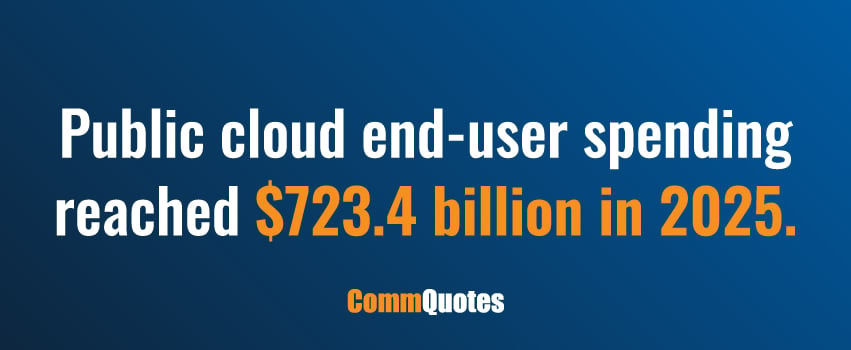
They're more than just industry jargon, too. Gartner estimates worldwide public cloud end-user spending reached $723.4 billion in 2025,1 and these three models account for the bulk of it. In this guide, we'll explain how IaaS, PaaS, and SaaS work, compare them side by side, and walk through how to pick the right one for your business.
What Are IaaS, PaaS, and SaaS?
All three let you rent computing instead of owning it. You pay a subscription or pay for what you use, and the provider runs the hardware. What changes is how much the provider manages on your behalf. Let’s break each of these down below:
What Is IaaS?
IaaS stands for Infrastructure as a Service. Your business rents the basic IT infrastructure building blocks – servers, storage, and networking – while the provider owns and maintains the physical hardware. You manage everything on top of it, including the OS, applications, data, and security settings.
IaaS gives you the most control of the three models. Read more about what IaaS is and how it works.
What Is PaaS?
PaaS stands for Platform as a Service. The provider manages the hardware, the operating system, and the development tools. You bring your code and your data.
PaaS is built for developers. It gives them a ready environment to build, test, and launch applications without setting up servers or installing software first. Read more about what PaaS is and how businesses use it.
What Is SaaS?
SaaS stands for Software as a Service. This is finished software that you access through a web browser or app. The provider handles everything: hardware, software, updates, security patches, and uptime. You log in and use it.
SaaS vs PaaS vs IaaS: Side-by-Side Comparison
Here’s how the three models stack up across the factors that tend to drive the decision, from who uses each one to how they're typically priced:
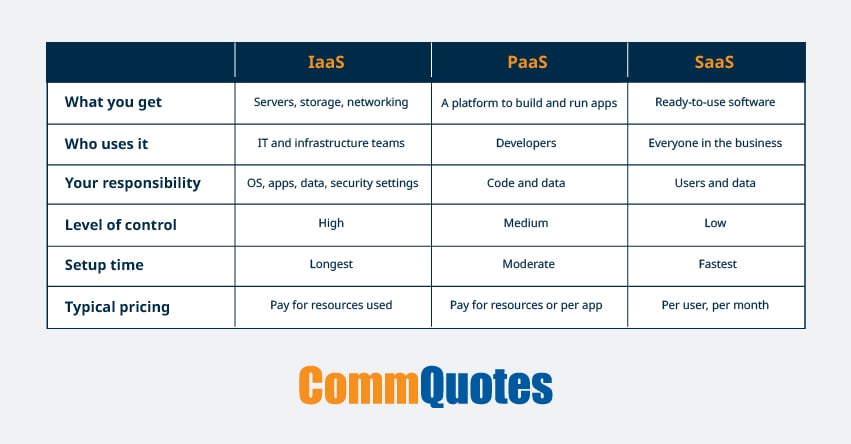
The right model depends on how these trade-offs line up with your team's skills, your budget, and what you're actually trying to accomplish.
What’s the Main Difference Between IaaS, PaaS, and SaaS?
The easiest way to see the difference between IaaS, PaaS, and SaaS is to look at who manages what.
- IaaS: The provider manages the physical servers, storage, and network. You manage the operating system, middleware, apps, and data.
- PaaS: The provider manages the servers, storage, network, operating system, and development tools. You manage your apps and data.
- SaaS: The provider manages all of it. You manage your users and your data inside the app.
As you move from IaaS to PaaS to SaaS, you give up some control. In return, you take on less work.
IaaS vs PaaS vs SaaS: Head-To-Head
Looking at all three at once can get abstract, so it helps to compare them two at a time. The most common decisions businesses face are IaaS vs PaaS and PaaS vs SaaS, and here's how each of those shakes out:
IaaS vs PaaS
IaaS vs PaaS comes down to control versus convenience. IaaS lets you set up an IT environment exactly how you want, which is useful if you have specific security rules or custom configurations. But your team has to patch, update, and maintain everything that sits on top of the infrastructure.
PaaS removes that work, so your developers can focus on writing code rather than managing servers. The tradeoff is less flexibility – you work within the tools and programming languages the platform supports.
PaaS vs SaaS
PaaS vs SaaS is a build versus buy question. With PaaS, you build your own application. With SaaS, you use an application someone else already built.
If a SaaS product already does what you need, it’s almost always faster and cheaper to buy it. PaaS makes sense when you need something custom that no existing product covers, like a customer portal or an internal tool built around your own process.
Common IaaS, PaaS, and SaaS Examples
Let’s explore some of the most widely used options in each category, along with the kinds of jobs businesses rely on them for:
Examples of IaaS
The most popular IaaS options include:
- Amazon EC2
- Microsoft Azure Virtual Machines
- Google Compute Engine
Businesses turn to IaaS when they're moving on-premises servers to the cloud, hosting websites or apps that need to scale up and down with demand, setting up backup and disaster recovery, or spinning up test and development environments that can be turned on and off as needed.
Examples of PaaS
Common PaaS options include:
- AWS Elastic Beanstalk
- Microsoft Azure App Service
- Google App Engine
- Heroku
- Salesforce Platform
Businesses use PaaS to build custom web apps, mobile app back ends, APIs, and internal business tools.
Examples of SaaS
SaaS covers most of the everyday tools your team already logs into. Some popular examples include:
- Microsoft 365
- Salesforce
- HubSpot
- Slack and Zoom
- QuickBooks Online
- ADP
- Dropbox
Businesses rely on SaaS for everything from email and file sharing to managing customer relationships, running payroll, keeping the books, and connecting teams over chat and video.
How To Choose the Right Cloud Model
Choosing the right model is less about which one is best overall and more about which one fits the job in front of you. Asking these five questions will usually point you in the right direction:
- Does a product already exist that does what you need? If yes, start with SaaS.
- Are you building your own application? If yes, look at PaaS first.
- Do you need full control over the operating system and configuration? If yes, IaaS is likely the right fit.
- What can your IT team support? IaaS takes the most skill and time to manage. SaaS takes the least.
- What are your security and compliance needs? Regulated industries may need more control over where data lives and how it is protected. That can point toward IaaS or toward specific providers.
For most businesses, the answer isn’t one model but a mix of all three, matched to the job each does best. If you’d rather not sort through those trade-offs on your own, CommQuotes can help you map each workload to the right model and the right provider, at no cost to you.
Frequently Asked Questions
What does PaaS stand for?
PaaS stands for Platform as a Service. It is a cloud model that gives developers a ready environment to build, run, and manage applications without maintaining the servers or operating system underneath.
PaaS vs IaaS: Which one costs less?
It depends on how you use it. PaaS often costs less overall because you don't pay staff to manage operating systems and updates. IaaS can cost less for steady, predictable workloads if your team is already set up to manage it. Compare the full cost, including labor, not just the monthly bill.
Can a business use IaaS, PaaS, and SaaS at the same time?
Yes, and most do. A common setup is SaaS for everyday tools, PaaS for custom apps, and IaaS for workloads that need more control.
Choose a Best-Fit Cloud Provider With CommQuotes
Knowing which model you need is the first step. Choosing the right provider is the harder part. Pricing, contract terms, support, and performance vary a lot from one provider to the next.
At CommQuotes, our team helps organizations compare cloud solutions from 450+ vetted providers. We look at your workloads, budget, and goals, then recommend the options that fit. There’s no cost to your business, and we often secure better pricing than you would get going direct.
Ready to find the right cloud solution for your business? Connect with our team today.
Sources: