TL;DR
-
Before migrating, decide whether Teams is really the problem or whether you can keep it and fix only the weak part, like using Direct Routing to cut calling costs.
-
A smooth switch depends on a clear plan: assess your current usage, pilot with a small group, migrate data carefully, train your team, and roll out in phases.
-
Cost is the usual trigger, so weigh the full cost of switching, including migration, overlap licensing, and training, across 12 to 24 months rather than monthly prices.
-
Plan around the predictable pitfalls, including data loss, skipping a parallel run, and leaving old Microsoft licenses running after the move.
With the recent changes to Microsoft Teams licensing, some businesses are exploring alternatives that better fit their needs and budgets. Transitioning from Microsoft Teams to a new communication platform can seem daunting, but with careful planning and execution, it can be a smooth and seamless process. This step-by-step guide will help you navigate the transition from Microsoft Teams – with minimal disruption and maximum efficiency.
Why Businesses Are Moving Away From Microsoft Teams
Most companies don't leave Teams over a single complaint. The decision usually builds from a mix of rising costs, licensing changes, and gaps that surface as an organization grows. Knowing the common drivers helps you judge whether your own reasons justify a switch.
Microsoft's licensing has shifted repeatedly since 2023. After EU regulatory pressure, Microsoft unbundled Teams from its Microsoft 365 and Office 365 suites worldwide on April 1, 2024, selling it separately as Microsoft Teams Enterprise at about $5.25 per user per month in the US, which added roughly $3 per user for businesses that wanted both. In November 2025 Microsoft began offering bundles with Teams again for new customers and committed to greater interoperability and data portability, a change that has made moving content to a competing platform easier than it used to be.
-
Rising costs: Microsoft 365 Business Basic runs $6 per user per month, with an increase to $7 scheduled for July 2026, and most calling features sit behind paid add-ons.
-
Microsoft 365 lock-in: Teams delivers its full value only when you're already committed to the Microsoft ecosystem.
-
Calling plan limitations: Native PSTN coverage has gaps in many countries, and advanced call-handling features are limited or cost extra.
-
Guest-access friction: External collaborators often have to create Microsoft accounts or navigate a guest flow that many find confusing.
-
Performance and complexity: Teams is resource-heavy, and its mix of chats, channels, and tabs slows down non-technical users.
-
Data residency: Organizations with strict sovereignty requirements can't self-host Teams.
If one or more of these match your situation, the considerations below will help you choose a replacement that addresses them.
Should You Replace Microsoft Teams or Optimize It?
Replacing Teams is not always the right answer. Before you commit to a full migration, get specific about what is actually broken, because the fix for a clunky collaboration experience is very different from the fix for an expensive phone bill. Confusing the two leads to disruption you didn't need.
When Replacing Teams Makes Sense
-
Collaboration is the problem: Chat, channels, or meetings are too slow or confusing for your team, and retraining hasn't fixed it.
-
You've moved off the Microsoft ecosystem: Your stack runs on Google Workspace or other non-Microsoft tools, and Teams integrations feel like an afterthought.
-
You need self-hosting or strict data residency: Compliance or sovereignty rules out Microsoft's cloud, which Teams can't accommodate.
-
You're consolidating tools: You want one platform to replace several, and Teams doesn't cover enough of them.
When Optimizing Teams Is the Better Move
-
The pain is calling cost or coverage: Microsoft Calling Plans are expensive or lack local numbers where you operate. Direct Routing connects Teams to a third-party voice provider and keeps everything else in place.
-
You only need better call handling: IVR menus, call queues, and voicemail-to-email can be layered onto Teams without a migration.
-
Your team likes Teams for chat and video: If collaboration works and only the phone layer falls short, replacing the whole platform throws away a tool that's doing its job.
Diagnosing the real issue first saves you from a migration you may not need. If the answer is still a full switch, the steps further down walk you through it.
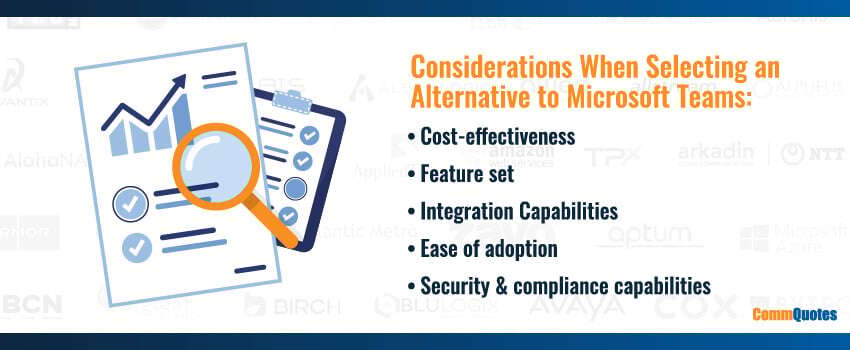
Key Considerations for Communication Platform Migration
Before you commit to a new communication platform, it's worth evaluating a few key factors to set the migration up for success. Here are the primary considerations to keep in mind.
Cost-Effectiveness
Assess the full financial impact of moving to a new platform, not just the monthly sticker price. Factor in upfront migration and training costs alongside the long-term financial benefits of the new solution, and compare the total against what Microsoft Teams costs you today.
Feature Set
Make sure the new platform offers the features and functionality your business actually relies on. Map your must-have capabilities against what each option provides, and compare them to what you use in Microsoft Teams so nothing critical gets lost in the transition.
Integration Capabilities
Verify that the new platform connects cleanly with your existing business systems, including CRM software, email platforms, and any other essential tools. This matters most if your stack is built around Microsoft 365, since some alternatives integrate with it more readily than others.
User Adoption
Consider how easily your team will take to the new platform and how much training it will require. The more intuitive the interface, the quicker your employees get up to speed and the less productivity you lose during the switch.
Security & Compliance
Confirm the new platform meets your organization's security and compliance requirements. This is especially important for businesses in regulated industries that must adhere to strict data-protection standards.
By weighing these factors together, you can select a platform that not only meets your current needs but also supports your future growth and development. Once you've worked through them, the next step is to assess your current usage and requirements.
The True Cost of Switching From Microsoft Teams
Cost is the most common reason businesses start shopping, but the cost of switching is easy to underestimate. A realistic comparison weighs one-time migration expenses against ongoing savings, not just the sticker price of the new platform.
One-Time Costs
-
Migration effort: Exporting chat history, channel files, and recordings takes staff time, and larger environments may need a third-party migration tool.
-
Overlap licensing: Running Teams and the new platform together during cutover means paying for both for a few weeks.
-
Training: Building documentation and running sessions for each user group is a real, if temporary, expense.
Ongoing Costs and Savings
-
New platform subscription: Compare like for like. Microsoft 365 Business Basic is $6 per user per month (rising to $7 in July 2026), and adding voice through Teams Phone runs about $8 per user plus roughly $12 to $24 for a calling plan.
-
Reduced add-ons: A platform that bundles voice, video, and messaging can remove several line items at once.
-
Voice savings: Moving the phone layer to a third-party provider often lowers per-minute and per-seat calling costs.
Total these figures over 12 to 24 months rather than comparing monthly headline prices. A platform that looks cheaper per seat can cost more once calling, integrations, and training are added in.
Step-By-Step Guide To Migrate From Microsoft Teams
Once you’ve determined the best course of action is to migrate your business to an Microsoft Teams alternative, there are a few key steps to take to optimize the transition.
1. Assess Your Current Usage
The first step in the transition process is to thoroughly assess how your business currently uses Microsoft Teams. Identify the features and functionality that are essential for your operations, and determine which ones are less critical. This assessment will help you choose a new platform that meets all your requirements.
- Inventory Features: List all the features you currently use in Microsoft Teams.
- Identify Gaps: Determine any gaps in your current setup that the new platform should address.
- User Feedback: Gather feedback from employees to understand their needs and preferences.
2. Select The Appropriate Communication Platform
Once you have a clear understanding of your current usage and requirements, it’s time to evaluate alternative communication platforms. Consider factors such as cost, features, integration capabilities, and user experience.
- Research Alternatives: Compare different platforms based on your assessment.
- Feature Comparison: Create a feature comparison matrix to evaluate each platform’s offerings.
- Vendor Demos: Schedule demos with potential vendors to see the platforms in action.
3. Plan The Transition
A well-structured transition plan is crucial to ensure a smooth migration process. Develop a detailed project plan that outlines timelines, responsibilities, and key milestones.
- Timeline: Establish a realistic timeline for the transition, including key milestones.
- Project Team: Assemble a project team that includes IT staff, key stakeholders, and end-users.
- Communication Plan: Create a communication plan to keep all stakeholders informed throughout the transition process.
4. Conduct Pilot Testing
Before rolling out the new platform organization-wide, conduct a pilot test with a select group of users. This pilot phase will help identify any issues and gather feedback for necessary adjustments.
- Select Pilot Group: Choose a diverse group of users for the pilot test.
- Gather Feedback: Collect feedback from pilot users to identify any issues or areas for improvement.
- Make Adjustments: Address any issues identified during the pilot phase and make necessary adjustments.
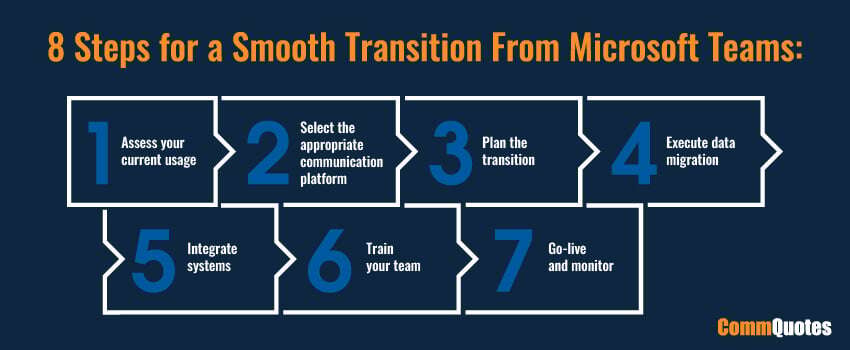
5. Execute Data Migration
Data migration is a critical step in the transition process. Plan and execute the migration of data from Microsoft Teams to the new platform, ensuring data integrity and security throughout the process.
- Data Inventory: Inventory all data that needs to be migrated.
- Backup Data: Back up all critical data to prevent loss during the migration.
- Migration Tools: Use automated tools to streamline the migration process.
6. Integrate Systems
Ensure the new platform integrates seamlessly with your existing business systems. This step is crucial to maintaining operational efficiency and avoiding disruptions.
- Identify Integrations: List all systems that need to be integrated with the new platform.
- Test Integrations: Conduct thorough testing to ensure compatibility and functionality.
- Resolve Issues: Address any integration challenges promptly.
7. Train Your Team
Proper training is essential for ensuring user adoption and maximizing the benefits of the new platform. Develop comprehensive training programs tailored to different user groups.
- Training Materials: Create user manuals, video tutorials, and quick-reference guides.
- Training Sessions: Conduct in-person and virtual training sessions to accommodate different learning preferences.
- Ongoing Support: Provide ongoing support to address any questions or issues that arise.
8. Go-Live & Monitor
Finally, it’s time to officially launch the new communication platform across the organization. Monitor the transition closely to ensure everything goes smoothly and gather user feedback for continuous improvement.
- Official Launch: Announce the official launch of the new platform to all users.
- Monitor Transition: Keep a close eye on the transition to identify any issues.
- User Feedback: Collect feedback from users to evaluate the success of the transition and make necessary improvements.
Common Microsoft Teams Migration Pitfalls to Avoid
Even a well-planned migration can go sideways, and the mistakes that cause the most disruption are predictable. That means you can plan around them before go-live.
-
Losing data you didn't account for: Teams stores content in several places, including channel files in SharePoint, chat history in Exchange, and recordings in OneDrive. Inventory and back up each location before you move anything.
-
Skipping the parallel-run period: Cutting everyone over at once leaves no safety net. Run both platforms together for two to four weeks so users keep access to historical content.
-
Under-communicating to users: Adoption stalls when people are caught off guard. Tell your team what's changing, when, and why, and give them a channel to ask questions.
-
Under-budgeting training: A new interface slows people down at first. Plan role-specific training instead of assuming the platform is intuitive.
-
Forgetting integrations and SSO: CRM connections, single sign-on, and directory links all need to be rebuilt and tested on the new platform before launch.
-
Leaving the old environment running: Once adoption is confirmed, decommission Teams and reassign or cancel the associated Microsoft licenses so you actually capture the savings.
Working through these in your transition plan keeps the move smooth and protects the cost savings that prompted it in the first place.
Microsoft Teams Migration FAQs
What are the best alternatives to Microsoft Teams?
The right alternative depends on what you need it for. Slack and Google Chat suit teams built on non-Microsoft stacks, Zoom Workplace works well where video is central, RingCentral and Webex fit large enterprises with compliance needs, and Rocket.Chat or Mattermost serve organizations that require self-hosting. Lark appeals to teams consolidating several tools into one. There's no single best option, only the best fit for your size, budget, and existing systems.
Do I have to leave Microsoft Teams entirely to fix it?
Not always. If your main complaint is calling cost or limited PSTN coverage, you can keep Teams and change only the voice layer through Direct Routing, which connects Teams to a third-party phone provider. That preserves your chat, video, and existing user training while fixing the phone bill. A full migration makes sense when the collaboration experience itself is the problem, not when a single add-on is the issue.
How long does it take to migrate off Microsoft Teams?
It depends on your size and how much history you move. Small teams can transition in a week or two, while larger organizations typically run a phased migration over several weeks. Most of that time goes to planning, exporting data, and a parallel-run period where both platforms operate at once. Building in two to four weeks of overlap lets users move at their own pace without losing access to past conversations and files.
Will I lose my chat history when I leave Microsoft Teams?
Not if you plan for it. Teams data lives in several locations, with channel files in SharePoint, conversations in Exchange mailboxes, and recordings in OneDrive. Before you migrate, inventory each location and export or back up what you need to keep. Some content, such as one-to-one chats and certain meeting artifacts, is harder to move, so confirm what your new platform and any migration tool actually support before cutover.
How much does it cost to switch from Microsoft Teams?
Budget for both one-time and ongoing costs. One-time costs include migration effort, any third-party migration tooling, training, and a short period of paying for two platforms during cutover. Ongoing, compare the new subscription against your current Microsoft spend, including Teams Phone (about $8 per user per month) and a calling plan ($12 to $24). Totaling these over 12 to 24 months gives a clearer picture than comparing monthly headline prices.
Should I migrate all at once or roll out in phases?
A phased rollout is the lower-risk choice for most businesses. Moving one team, department, or region at a time lets you catch problems early and adjust before they affect everyone. A single-event cutover is faster and can work for smaller environments, but it leaves little room for error. Whichever you choose, keep the old platform available during the transition so no one loses access to current work.
What should I do with Microsoft Teams after migrating?
Decommission it deliberately once adoption is confirmed. Verify that all critical data has moved and that people are working in the new platform, then disable Teams provisioning and reassign or cancel the associated Microsoft licenses. Skipping this step is a common way businesses keep paying for a tool they no longer use, which erases the savings the migration was meant to deliver. Keep your exported archive somewhere accessible in case you need it later.
Can I keep my phone numbers when switching from Teams?
Yes, in most cases. Number porting lets you bring existing business numbers to a new platform or voice provider, so customers keep dialing the same numbers and you avoid updating websites and business cards. Porting takes coordination and some lead time, so start the request early in your transition plan. Confirm that your new provider supports porting in every country where you hold numbers before you commit.
Ready To Make The Transition?
Transitioning from Microsoft Teams to a new communication platform can be a complex process, but with careful planning and execution, it can be done smoothly and efficiently. CommQuotes’ expertise in Microsoft Teams and other business communication tools allows us to provide tailored recommendations and support throughout your transition. Contact us today for expert, agnostic advice on finding the best communication solutions for your business – and for guidance toward a smoother migration process.